
Windows Server 2025 Hotpatching Is Now Free: What It Actually Means for Your Patch Cycle
Microsoft quietly removed the price tag on Azure Arc hotpatching for Windows Server 2025 in May 2026. After a decade of scheduling maintenance windows around Patch Tuesday, here's why I think this is one of the most underrated changes to hit Windows Server infrastructure in years.
I've lost more weekends to Patch Tuesday than I'd like to admit. Schedule the maintenance window, stage the updates, wait for the reboot, confirm every service came back up cleanly, then do it all again next month across every branch office server. Anyone who's managed Windows Server infrastructure for more than a year knows this rhythm intimately. So when Microsoft quietly made Azure Arc-enabled hotpatching free for Windows Server 2025 in May 2026, it didn't get the headline treatment it deserved — but it's genuinely one of the more useful infrastructure changes I've seen from Microsoft in a while.
This post is a practical look at what actually changed, how the mechanism works under the hood, and whether it's worth turning on for your environment.
What Actually Changed
Effective May 15, 2026, Microsoft removed all billing for hotpatch on Azure Arc-enabled Windows Server 2025 machines — including servers running on-premises or in other clouds, not just in Azure. Before this change, hotpatching was free only for VMs running natively in Azure; if you wanted it on an Arc-enabled server sitting in your own datacenter, you paid $1.50 per core, per month. For a modest 64-core branch office fleet, that adds up fast.
Existing enrolled machines needed no action — the billing simply stopped. For everyone else, the barrier to entry just came down to: Windows Server 2025 (Standard or Datacenter), Azure Arc via the Connected Machine agent, and Virtualization-based Security (VBS) enabled.
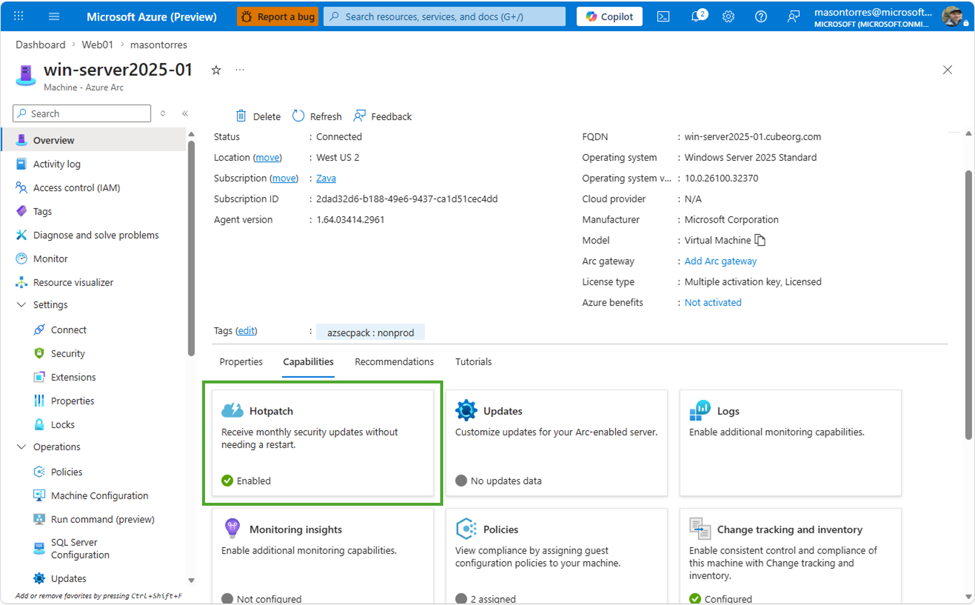
Figure: The Hotpatch capability shown enabled on an Azure Arc-connected Windows Server 2025 machine in the Azure Portal. (Source: Petri IT Knowledgebase)
How Hotpatching Actually Works
The mechanism is more interesting than the pricing change. Traditional Windows patching replaces files on disk and requires a reboot to load the new code into memory. Hotpatching skips that step entirely — it patches the loaded code of running processes and kernel components directly in memory, while the system keeps running.
Quarterly baseline. A standard cumulative update is applied on a scheduled cadence (roughly once per quarter). This is a normal update and does require a reboot — this is the one you actually plan around.
In-between hotpatches. For the months between baselines, security fixes are delivered as hotpatches — applied directly to the in-memory code of the affected processes and kernel components. No reboot, no service restart, no maintenance window.
Net effect. Instead of a reboot roughly every month, you're looking at around four planned reboots a year — the quarterly baselines — with security content landing continuously in between.
Reboot Cadence Comparison
| Patching Model | Reboots per Year | Security Update Frequency |
|---|---|---|
| Traditional monthly cumulative updates | ~12 | Monthly, tied to reboot |
| Arc-enabled hotpatching (Windows Server 2025) | ~4 (quarterly baseline) | Continuous, decoupled from reboot |
Why This Matters More Than It Sounds
A few months after this pricing change, Microsoft's September 2026 Patch Tuesday cumulative updates (KB5122876 for Server 2019, KB5122882 for Server 2022, KB5122871 for Server 2025) ended up breaking Remote Desktop Services on session hosts across all three versions. The failure pattern was nasty: servers would run fine for hours after the reboot, then RDP connections would start hanging at "Connecting…", existing sessions couldn't log off cleanly, and in the worst cases a second restart didn't fix it — admins needed a hard reset to restore RDS. The only reliable workaround was rolling the update back, which also rolls back that month's security fixes.
That incident is a pretty good illustration of exactly the risk hotpatching is designed to reduce: every traditional reboot-and-restart patch cycle is a chance for something to go sideways on a server that was working fine five minutes earlier — and this one didn't even show symptoms until hours after the reboot, which is a particularly unpleasant failure mode to troubleshoot.
It's not that hotpatching makes patches immune to bugs — a bad hotpatch can still cause problems. But cutting the number of full reboot-and-restart cycles from twelve a year to four meaningfully shrinks the number of times your infrastructure goes through that fragile transition point, and it means the security fixes that matter most (the ones patching actively exploited vulnerabilities) can land the same week they're released instead of waiting for your next scheduled maintenance window.
What You Should Do Right Now
If you're already running Windows Server 2025 with Azure Arc — this costs you nothing now. Check your Arc-enabled machines, confirm VBS is enabled, and subscribe to the Hotpatch service. There's no longer a cost trade-off to weigh.
If you're running Windows Server 2025 without Arc — onboarding to Azure Arc is worth evaluating on its own merits (unified management across hybrid and multicloud, not just hotpatching), and this removes one of the bigger reasons people hesitated to do it for on-prem fleets.
If you're still on Windows Server 2019 or 2022 — hotpatching for those versions isn't part of this change; it's specific to Windows Server 2025 (and Windows 11 Enterprise multi-session in Azure Virtual Desktop, separately). This is one more reasonably strong argument for prioritizing the upgrade path, on top of extended security update costs and the September RDS incident affecting older versions too.
Either way — keep your quarterly baseline maintenance windows. Hotpatching reduces reboot frequency, it doesn't eliminate the need for planned maintenance entirely. Treat the quarterly baseline with the same discipline you'd give monthly patching today.
My Take
Most of the news cycle around this kind of announcement focuses on the price tag, but the pricing story here is really just Microsoft removing friction from something that should already be a default best practice. Reboot-driven patching is a genuinely bad pattern for anything that needs to stay available, and it's been the default for Windows Server for two decades mostly because the alternative was hard to build safely. Hotpatching without needing to run purely inside Azure is the part that actually matters for the infrastructure teams I know — most enterprise environments are hybrid whether they planned it that way or not, and a feature that only worked for pure-Azure VMs was never going to move the needle on real-world patch compliance.
The honest caveat: this only helps if you actually turn it on. I've seen plenty of environments carry Azure Arc licenses for months without enabling half of what it offers. If you're paying for Arc already, enabling free hotpatching is one of the lowest-effort, highest-value things you can do with it this quarter.
This article was researched and drafted with AI assistance as part of an experiment in building a faster tech-writing workflow, then reviewed and edited before publishing.
Primary source: Patch the Kernel, Skip the Reboot: The Case for Arc-Enabled Hotpatching on Windows Server 2025 — Microsoft Tech Community
Secondary source: Microsoft Makes Azure Arc Hotpatching Free For Windows Server 2025 — Petri, May 28, 2026
Related: September Windows Server updates break Remote Desktop Services — BleepingComputer
Keep Reading
PoisonedRefresh: The F5 BIG-IP Rootkit That Hides Its Web Shell Where File Scanners Can't See
A Linux rootkit on compromised F5 BIG-IP APM appliances hooks Apache's PHP loader to inject a web shell straight into memory, leaving the on-disk webtop scripts byte-for-byte clean. It's tied to the exploited CVE-2025-53521, and it's a working blueprint for fileless persistence on the access gateways guarding enterprise identity.

No Password Required: Inside the CVSS 10 Bug That Let Anyone Rewrite Azure AI Language Models
Microsoft quietly fixed a CVSS 10.0 flaw in Azure AI Language Authoring that needed zero credentials to tamper with deployed language models — no patch to install, no PoC, barely a paragraph of explanation. Here's what the advisory says, and what it doesn't.
Deadbugz: The MCP Server That Waits Three Tool Calls Before It Turns Hostile
A GitHub account filed 23 pull requests in 74 minutes, each quietly adding a malicious MCP server. It behaves for exactly three tool calls, then rewrites its own metadata into instructions to hunt SSH keys, AWS credentials, and kubeconfigs.